← 回首頁

Writing Automaton

Interaction Design


Writing Automaton

Original Fab Academy page: https://fabacademy.org/2015/as/students/huang.yi-pin/finalProject.html

18 - Final Project

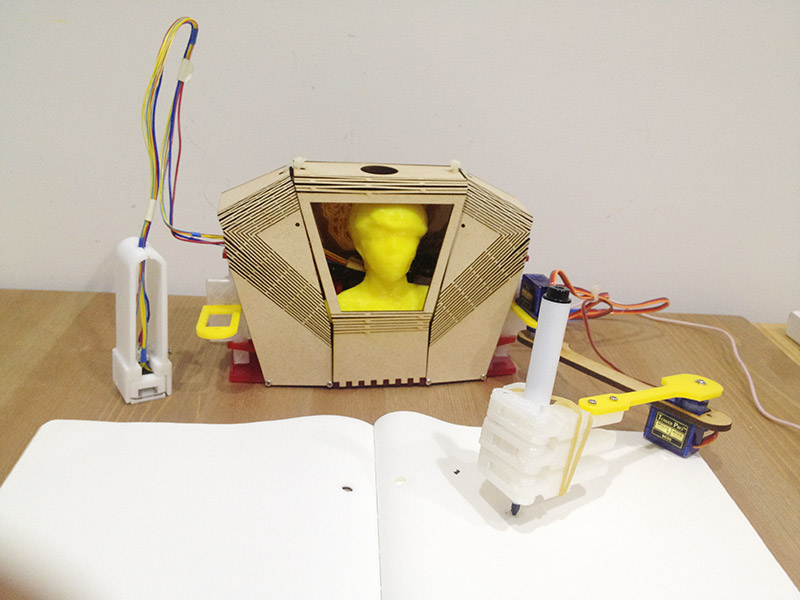
My final project is Writing Automaton. I like this project very much because I can integrate lots of skill I learn in Fab Academy.

Demonstration

Arm Design

Arm design is the most important part. I study arm structure by using paper prototype. Hand made prototype helps me understand where to put servo and how they move.

Arm Design

Automaton Body

The design goal of body should have enough space for at least 2 curcuit boards and 2 servo motors. I create a 3D model to study the shape, space and mechanical structure.

Automaton Body

A plugin Flattery in sketchup is a nice tool to help unfold a 3D model to paper craft. Paper craft layout can be saved as SVG, but I should add some screw holes and latches manually in illustrator. The first prototype is shown below:

First Prototype

There is not enough space for servo motor to LIFT the arm. And the bending curve of MDF can be easily break when I assembled parts.

I did some experiments on laser curve bent wood with MDF. Hinge gaps are too big in the first generation, so that it sometimes slplited when I bent. The 2nd generation is the worst. The 3rd one is not bad.

Laser Experiments

Assembling:

Assembling

Laser Cut Design

Shoulder joint is recommended using a 3D printed part. Because 3D part has some tolerance.

Shoulder Joint

Hand

I think that will be great to create a hand.

Hand 3D Model 3D Printed Hand

Hand is cool, but 3d printed parts are to heavy. It causes arm unable to lift up.

Input devices

I hacked a mouse to get an optical sensor, and redesign it to become a optical sensor pen.

There was a small lens inside optical mouse. I used wire saw to cut the size I want. In order to make it work, the relationship among red LED, optical sensor and lens can not be changed.

Optical Sensor Sensor Parts

If it is possible, measure the parts with a calipers.

Measuring Pen Design

Mechnical test. I tried to add a switch in my input device. The original idea is like when I push this pen (which means when I am writing), Writing Automaton's arm will put on writing surface. vice versa, when I lift the pen, Automaton's arm also lifts.

Mechanical Test

I desoldered the optical sensor very carefully. Luckly, I found snesor(PAW3512DK)'s scheme and data sheet on Internet.

Sensor Desoldering

Simulating a cursor. I am lucky again, it works!

Cursor Test

Coding

I developmented the system with Processing and Arduino IDE. Most of the computing is done in Processing. I setup serial communication between Processing and the board. The only thing my board need to do is assign angles value to each motor.

1. Angle value in Processing:

Trigonometric
int rootX; int rootY; int ex, ey, hx, hy; int armLength; import processing.serial.*; Serial myPort; String value; float upperDegree; float lowerDegree; int upperDegreeInt; int lowerDegreeInt; int servoLowerAngle; int servoUpperAngle; void setup() { size(1000, 1000); background(#ff9900); String portName = Serial.list()[4]; //change the 0 to a 1 or 2 etc. to match your port myPort = new Serial(this, portName, 115200); rootX = width/2; rootY = 800; armLength = 400; } void draw() { fill(255); rect(0, 0, width, height); upperArm(); } void upperArm() { print("x: "+mouseX+" / "); println("y: "+mouseY); int dx = mouseX - rootX; int dy = mouseY - rootY; float distance = sqrt(dx*dx+dy*dy); int a = armLength; int b = armLength; float c = min(distance, a + b); float B = acos((b*b-a*a-c*c)/(-2*a*c)); float C = acos((c*c-a*a-b*b)/(-2*a*b)); float D = atan2(dy, dx); float E = D + B + PI + C; ex = int((cos(E) * a)) + rootX; ey = int((sin(E) * a)) + rootY; print("UpperArm Angle= "+degrees(E)+" "); upperDegree = degrees(E); hx = int((cos(D+B) * b)) + ex; hy = int((sin(D+B) * b)) + ey; println("LowerArm Angle= "+degrees((D+B))); lowerDegree = degrees((C)); upperDegreeInt = int(upperDegree); lowerDegreeInt = int(lowerDegree); println("convert degree to int: "+upperDegreeInt+" / "+ lowerDegreeInt); drawIK(); // mapping angle value to servo motor angle servoUpperAngle = int(map(upperDegreeInt, 180, 360, 0, 180)); servoLowerAngle = abs(lowerDegreeInt); //println("upper: "+servoUpperAngle); sendDegree(); } void drawIK(){ stroke(255, 0, 0); fill(240, 0, 0); ellipse(rootX, rootY, 20, 20); // root ellipse(ex, ey, 10, 10); // end point of upper arm ellipse(hx, hy, 6, 6); // end point of lower arm stroke(0); strokeWeight(3); line(rootX, rootY, ex, ey); line(ex, ey, hx, hy); stroke(0); } void sendDegree() { String upperAngle; String lowerAngle; if (servoUpperAngle<100) { upperAngle="0" +str(servoUpperAngle); } else { upperAngle=str(servoUpperAngle); } if (servoLowerAngle<100) { lowerAngle="0" +str(servoLowerAngle); } else { lowerAngle=str(servoLowerAngle); } value=upperAngle+","+lowerAngle+"\n"; println(value); myPort.write(value); }

2. Programming on my board:

int buf = 0; int upperArmDegree = 0; int lowerArmDegree = 0; #include <SoftwareServo.h> SoftwareServo upperServo; // Joint at base SoftwareServo lowerServo; // Elbow between a and b #include <SoftwareSerial.h> SoftwareSerial mySerial(6, 5); // RX, TX void setup(){ upperServo.attach(7); lowerServo.attach(8); mySerial.begin(115200); } void loop(){ if (mySerial.available() > 0) { readCoordinates(); delay(2); if(mySerial.available() == 0){ mySerial.print(upperArmDegree); mySerial.print(","); mySerial.println(lowerArmDegree); } moveArm(); } } void readCoordinates(){ byte inByte = mySerial.read(); if(inByte != 10 && inByte != ','){ //newline(10) and , are special buf = buf*10; buf += (int)(inByte - '0'); } else if(inByte == ','){ upperArmDegree = buf; buf = 0; } else { lowerArmDegree = buf; buf = 0; } } void moveArm(){ upperServo.write(upperArmDegree); lowerServo.write(lowerArmDegree); }

Board design

Board design is a part of look and feel in my project. I put the board on the back of Writing Automaton. I created 2 boards, each of them suppose to control one arm.

- PCB(A).sch / PCB(A).brd

- PCB(B).sch / PCB(B).brd

PCB APCB B

PCB Assembly

The back of Writing Automaton:

Back View

Materials

1. M2 screw
2. MDF
3. Acrylic
4. Attiny44 x 2, capacitors, and reisistors.
5. 9g servo motor x 3 (at least)

Source files

- Automaton Body 2D
- Automaton Body 3D
- Shoulder
- Hand
- Optical Sensor holder
- PCB(A).sch / PCB(A).brd
- PCB(B).sch / PCB(B).brd
- Arm control / GUI by Processing

Demonstration